
You don't need to delete your listing to take it off the site for a while. A status chip on your property card lets you take it offline and put it back online as often as you like.
1. Where to find the status
Log in, click the account icon then "My Immovlan". In the left-hand menu, under My listings, open "My properties". Each listing appears there as a card, with a chip showing its current status — "Published" for a visible listing.
Clicking that chip opens the list of available statuses.
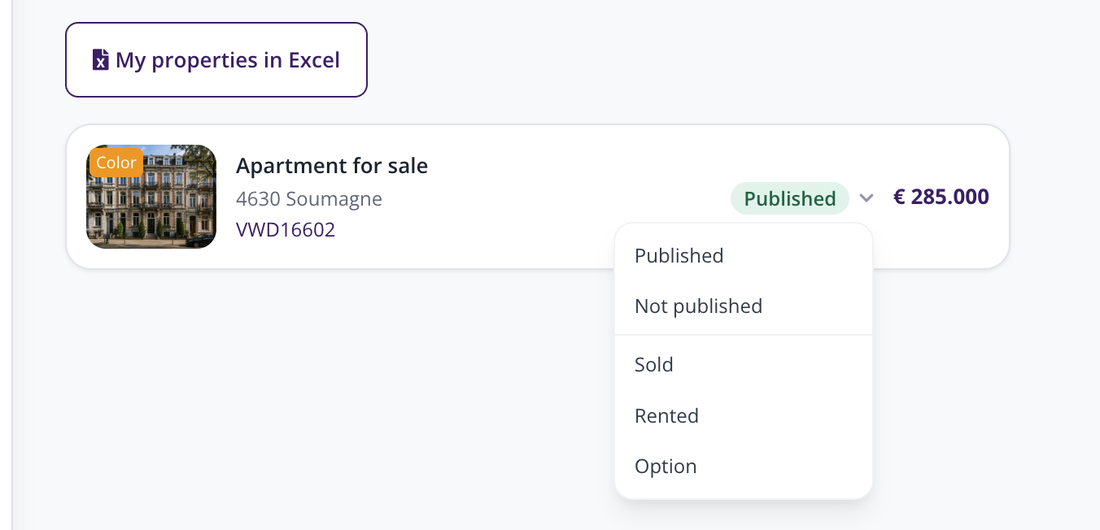
The status chip on your listing's card.
2. The five statuses
- Published: the listing is visible to visitors.
- Not published: the listing is removed from search results. It stays in your personal area, ready to go back online.
- Sold: the property has found a buyer.
- Rented: the property has found a tenant.
- Option: an offer is under way, but nothing has been signed yet.
3. Reactivating a listing
The path is the same: open "My properties", click the chip on the listing concerned and choose "Published". The change takes effect immediately.
| Keep in mind: changing the status does not delete your listing. Its content, photos and statistics stay available in your personal area. |