
1. Open the classic search
On the homepage, below the description field, click the « Or use the classic search » link. The form replaces the description area. The « Or describe what you're looking for » link takes you back the other way.
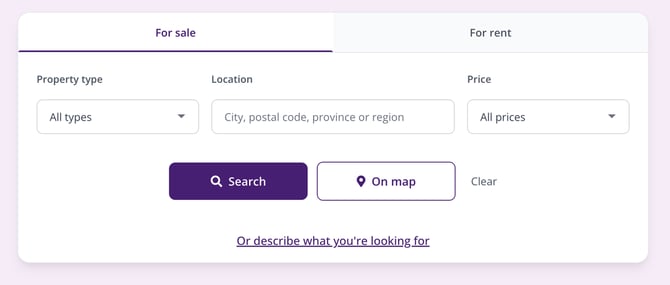
The classic search form on the homepage.
2. Choose between buying and renting
Two tabs sit at the top of the form: For sale and For rent. The For sale tab is selected by default; click For rent to search for a rental.
3. Fill in the three criteria
- Property type: a drop-down menu offers « All types », « House + Apartment », « House », « Apartment », « Land », « Business », « Garage », « Investment property », and « Miscellaneous ».
- Location: type the first few letters in the « City, postal code, province or region » field, then pick from the list that appears. Each choice is added as a tag below the field: you can stack several and remove one with the cross. The « + Suburbs » option also adds the localities attached to the town, which usefully widens your search area.
- Price: a drop-down menu offers preset brackets, from « < €200,000 » to « €750,000+ ». Leave it on « All prices » if you'd rather set your budget later, down to the euro, from the results page.
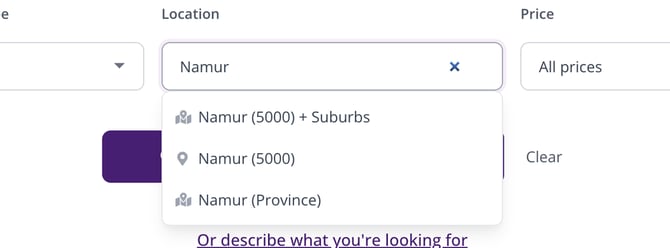
Type the first letters of the location: Immovlan suggests the town, the town with its suburbs, or the province.
4. Start the search
Two buttons are available:
- « Search » shows the list of matching properties;
- « On map » shows the same properties on a map, where you can draw your own search area (How do I search for a property graphically on a map?).
The « Clear » link resets the form.
| Keep in mind: these three criteria are just a starting point. The number of bedrooms, floor area, EPC/PEB rating, garden, or garage are set afterwards from the results page: What search criteria are available on Immovlan? |
This article is part of the How do I search for a property on Immovlan.be? series, which presents the four ways to search for a property.