
1. Where does this come in the journey?
The publication journey has ten steps. The EPC is asked for at the seventh, called « Your property's energy performance », right after presenting your property and right before your contact details.
2. Enter the consumption figure
Fill in the « Spec primary energy consumption (kWh/m²/year) » field with the value shown on your certificate. As soon as you enter a figure, the matching EPC label appears to the right of the field — the letter and its colour, just as on the official certificate.
An « Edit » link next to that label lets you pick the energy class shown on your certificate directly.
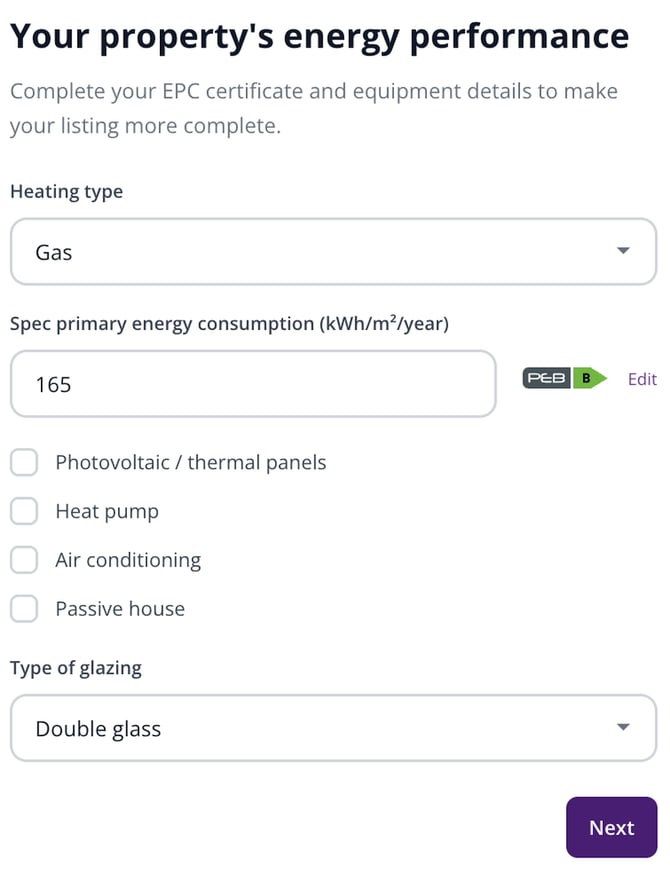
The « Your property's energy performance » step: the consumption entered, the EPC label displayed on the right.
3. Complete the rest of the step
The same step gathers everything to do with energy and thermal comfort:
- « Heating type »: gas, fuel oil, electricity, coal, wood, solar energy, or not specified.
- Four checkboxes: photovoltaic / thermal panels, heat pump, air conditioning and passive house.
- « Type of glazing »: simple, double or triple glass.
| Tip: none of these fields is required to publish, but they are among the first criteria buyers filter on. A listing with its EPC filled in turns up in more searches. |
4. Changing the EPC after publication
Has your certificate been updated, or did you enter the wrong figure? From « My properties », open your listing, go to the edit form and find the energy section.