
1. Click “Search on the map” from the homepage
On Immovlan’s homepage, click the "Search on the map" button (see screenshot below).
You’ll be taken to an interactive map of Belgium showing all properties for which the address is available.
2. Use the filters to refine your search
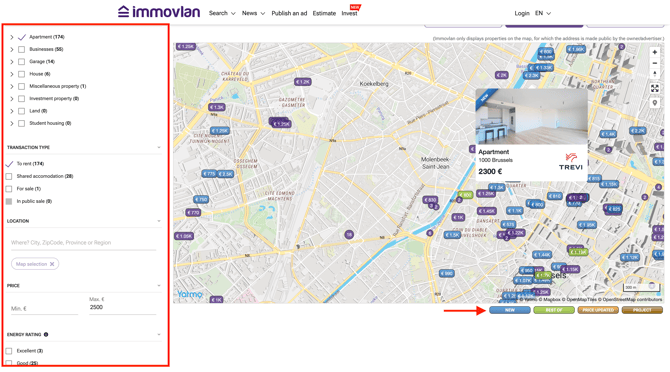
On the left-hand side of the screen, you can narrow down your search using various filters:
-
Property type (apartment, house, garage, etc.)
-
Transaction type (for rent, for sale, shared housing…)
-
City, postal code or region
-
Price range
-
Energy performance
The map will automatically update based on the filters you apply.
3. Understand the map using the legend
The properties shown on the map come with color-coded labels indicating their status: new listing, price reduced, project, etc.
👉 You’ll find the legend in the bottom-left corner of the map.
4. View listings directly from the map
Click on a price label on the map to open a preview of the listing. If the property interests you, click the preview to view the full listing.
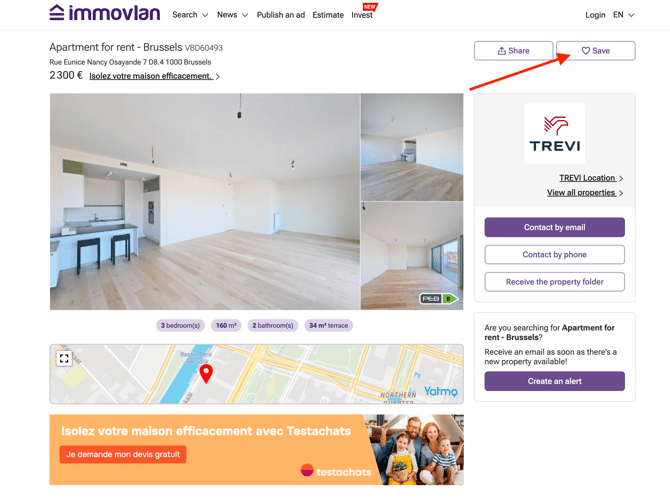
Found one you love? Click "Save" to add it to your favorites and easily find it again later.