
1. Write your project in the search field
On the homepage, click in the « Describe what you're looking for... » field and write your search in your own words. Then click the « Search » button.
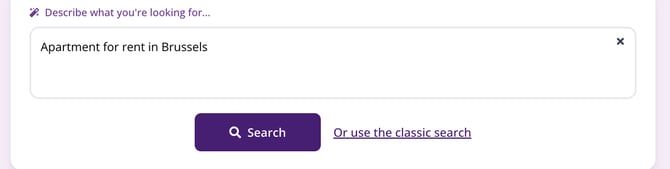
The free-text search field on the homepage, and its « Search » button.
2. Give at least three pieces of information
For Immovlan to understand your request, your sentence needs to include at least:
- the property type: house, apartment, land, garage, and so on;
- the transaction type: for sale or for rent;
- the location: a town, a postal code, a province, or a region.
« Apartment for rent in Brussels » is enough to get you started. You can of course say more right away: the number of bedrooms, your budget, a garden, a terrace.
| Tip: write a simple, direct sentence. Long or heavily detailed wording is understood less well than a short phrase such as « House for sale in Namur ». |
3. Answer the follow-up questions
Immovlan replies « Got it! », restates your request in one sentence, and tells you how many properties match it. It then asks for whatever is still missing to narrow the search:
- « How many bedrooms do you need? »;
- « Did you have a price range in mind? », with brackets suited to buying or renting.
Each question takes one click to answer, and the « No preference » button lets you skip the one that doesn't apply to you. The number of properties shown updates with every answer, so you see the effect of your choice straight away.
4. Check the summary and run the search
Finally, Immovlan shows a full summary under the heading « Is this correct? ». The « Refine: » line lists each of your criteria as a label you can adjust one by one. Two buttons leave the final say to you:
- « No, I want to change » to correct your request;
- « Yes, show results » to open the property list.
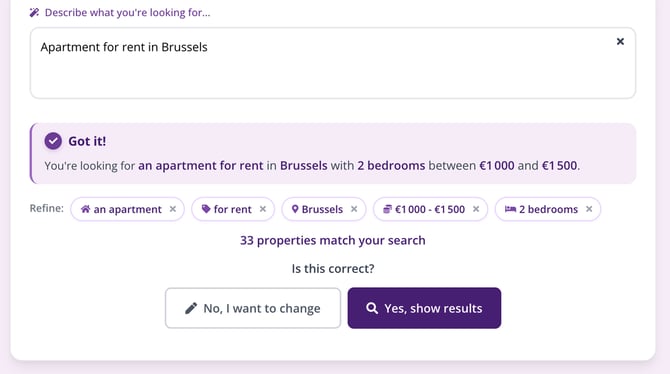
The « Is this correct? » summary, shown before the results.
If your search isn't understood
Rephrase your sentence with simpler words, making sure to mention the property type, the transaction type, and the location. You can also switch to the usual form at any time using the « Or use the classic search » link, just below the search field: How do I start a search with the basic criteria?
This article is part of the How do I search for a property on Immovlan.be? series, which presents the four ways to search for a property.