What are the mandatory fields for publishing a property (apartment or house) on Immovlan.be?
The essential information for publishing your listing online, step by step.
Publishing a listing takes 10 steps. Good news: only a small part of the information is actually mandatory. Here's what it is, in the order you'll encounter it, so you can save time and prepare your data before you start.
How do you recognise a mandatory field?
An asterisk (*) follows the label of every field you must fill in. As long as one of these fields is empty, the "Next" button won't let you move to the next step. All other fields are optional: you can complete them later, even after your listing goes live.
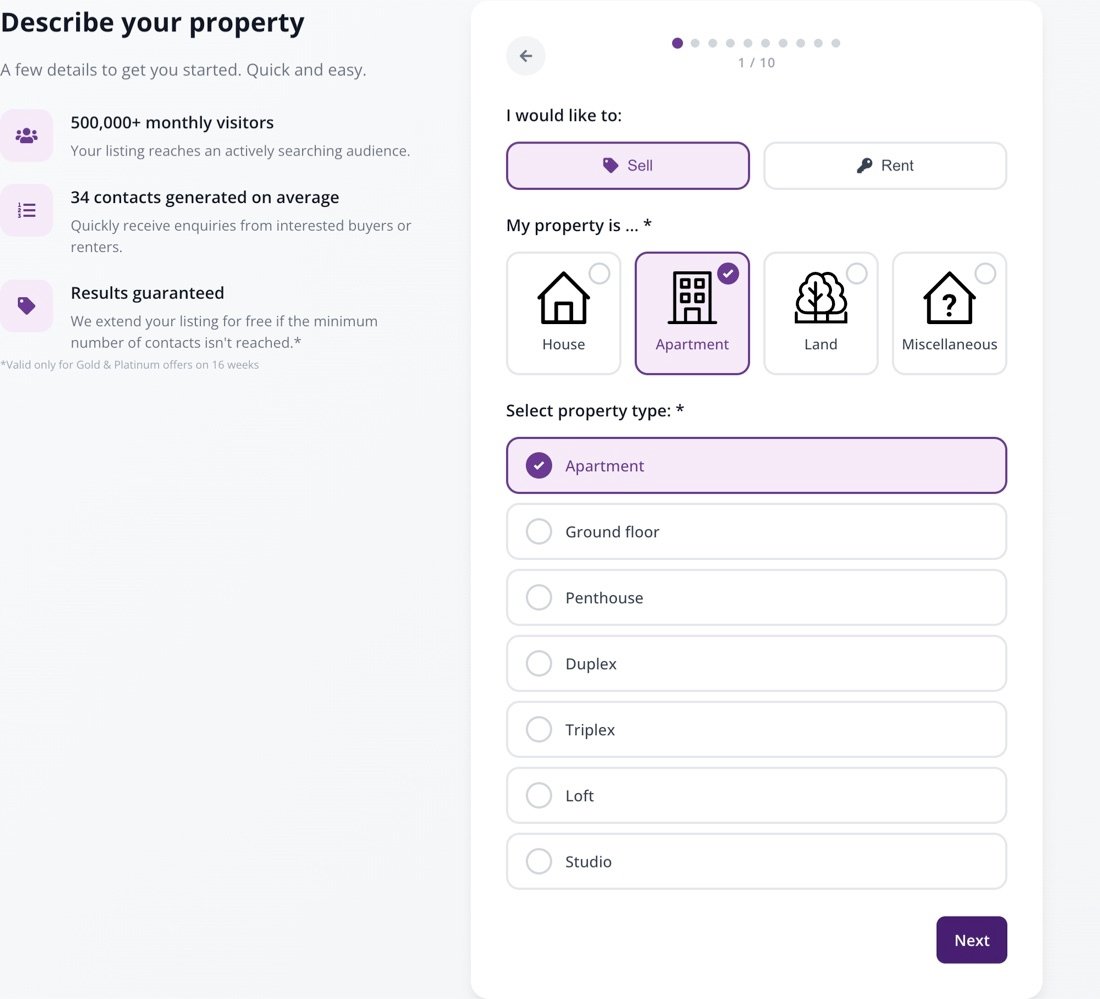
1. Property type (step 1/10)
Two mandatory fields:
- "My property is ... *": choose House, Apartment, Land or Miscellaneous.
- "Select property type: *": specify the sub-category. For an apartment: Apartment, Ground floor, Penthouse, Duplex, Triplex, Loft or Studio.
The "I would like to:" choice (Sell or Rent) is already set to Sell: check that it matches your plans.

Step 1: the two fields marked with an asterisk.
2. Property address (step 2/10)
Two mandatory fields: "Where? City, Postal code,... *" and "Street *". The number and box remain optional, but a complete address makes your listing more credible.

Step 2: the town and street are enough to continue.
3. Price (step 3/10)
Only one mandatory field: "What will be your selling price? *" — or the rent if you're letting. The cadastral income, VAT and monthly expenses are optional.

Step 3: only the price is essential.
4. At least one photo (step 4/10)
No asterisk here, but there's a clear rule: "Property photos and video/virtual visit (1 to 32 photos)". You need at least one photo to publish. Immovlan recommends at least eight. The video or virtual visit is optional.

Step 4: drag and drop your photos, then reorder them with your mouse.
5. Surface area and bedrooms (step 5/10)
Two mandatory fields: "Livable surface (m²) *" and "Number of bedrooms *". The number of bathrooms, garage, garden and terrace are optional — but these are widely used search criteria: completing them increases your chances of appearing in search results.

Step 5: the livable surface and the number of bedrooms.
6. Your contact email (step 8/10)
Only one mandatory field: "Your email address *". It's never displayed publicly and is only used to receive enquiries about your listing. The phone number is optional, but it's required to benefit from the results guarantee.

Step 8: the email address that will receive enquiries from candidates.
Steps with no mandatory field
Steps 6/10 (description, number of facades, construction year, state of the property) and 7/10 (energy performance) contain no fields marked with an asterisk. You can skip them and complete them later.
| Tip: the EPC certificate is legally mandatory when selling or letting in Belgium. Enter the primary energy consumption at step 7: the EPC badge is calculated automatically and displayed on your listing. |
To finish: the package and the terms
At step 9/10, choose a publication length (8, 12 or 16 weeks) and a package (Silver, Gold or Platinum). At step 10/10, tick "I accept the privacy policy of Immovlan.be as well as the general conditions concerning the publication of my advertisement.", then select your payment method. Your listing goes live as soon as payment is confirmed.
In summary: the mandatory actions to publish your property
| Step | What you must do |
|---|---|
| 1/10 | Choose the property category, then the precise type |
| 2/10 | Enter the town or postal code, and the street |
| 3/10 | Enter the selling price or the rent |
| 4/10 | Add at least one photo (8 recommended) |
| 5/10 | Enter the livable surface and the number of bedrooms |
| 6/10 and 7/10 | Nothing mandatory — you can complete these later |
| 8/10 | Enter your contact email |
| 9/10 | Choose a publication length and a package |
| 10/10 | Accept the terms and conditions and pay |